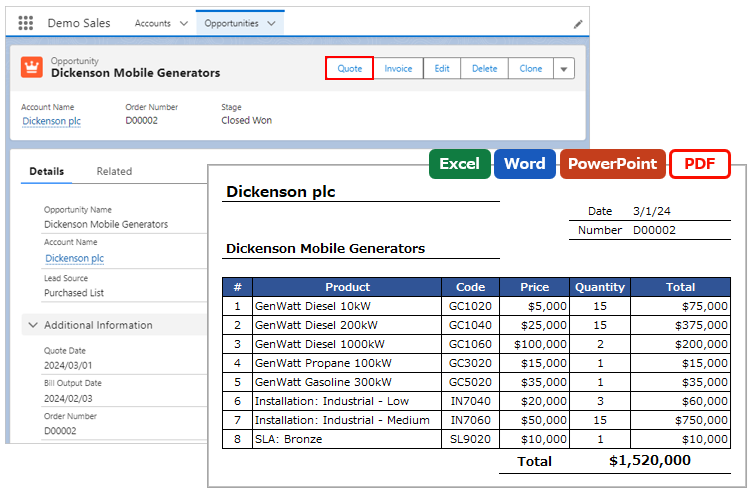
Output related files in separate tables for each filter criteria.
*This feature is available in Office File Creator Pro.
Overview
Examples of Use
- Output a list of related files related to Account, separated by file format.
Required settings
- Merge Fields Settings
- OFC_Child Object Option Record Settings
Determine Child Relationship Name
Determine the child relationship name used to link the merge fields to the OFC_Child Object Option record.
Naming Rules for Child Relationship Name
Set either (any name)ContentDocument or (any name)Attachment. The text in parentheses must begin with a letter of the Roman alphabet, and only alphanumeric characters and underscores are allowed.
Examples of child relationship names
(doc)ContentDocument
(image)ContentDocument
Merge Fields Settings
Set the merge field in the template file in the form of {!Child Relationship Name.Field API Name}.
Example: Outputs a list of related files of the master object in two tables
Table 1: {!(doc)ContentDocument.Title}
Table 2: {!(image)ContentDocument.Title}
OFC_Child Object Option Record Settings
Open the OFC_Child Object Option record detail page. Create OFC_Child Object Option records for the number of tables to be separated by the filter criteria.
Reference: Create OFC_Child Object Option Record
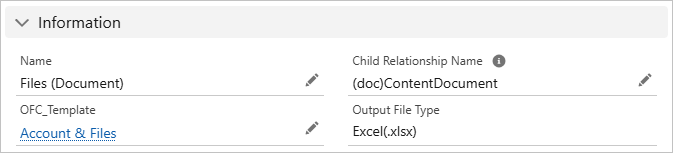
Information
Name: Enter any name. e.g. Files (Document)
Child Relationship Name: Enter the child relationship name. e.g. (doc)ContentDocument
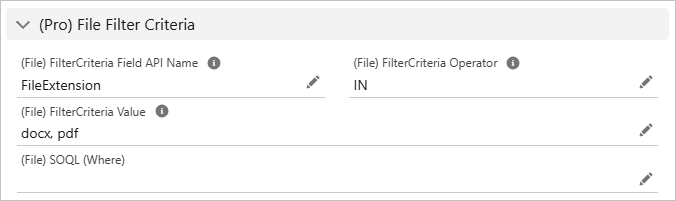
(Pro) File Filter Criteria
Set the conditions for related files.
(File) Filter Criteria Field API Name: Enter the field API name for filtering ContentDocument, ContentDocumentLink, or Attachment records.
(File) Filter Criteria Operator: Select the operator for filtering records.
(File) Filter Criteria Value: Enter the value for filtering records.
(File) SOQL (Where): For multiple conditions, enter a SOQL condition clause.
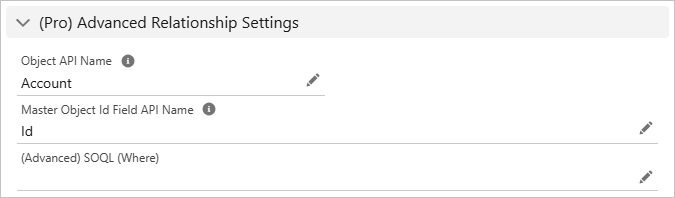
(Pro) Advanced Relationship Settings
Object API Name: For files related to a master object, enter the object API name of the master object. For files related to child objects, enter the object API name of the child object.
Master Object Id Field API Name: For files related to a master object, enter "Id". For files related to child objects, enter the lookup field API name of the master object. For the third level and beyond, enter a cross-object formula that references the Id of the master object.
Setting Example
Example of files related to a master object: The master object is Account and files related to the Account
Child Relationship Name: (doc)ContentDocument
Object API Name: Account
Master Object Id Field API Name: Id
Example of files related to a two-level child record: The master object is Account and files related to the Opportunity related to the Account.
Child Relationship Name: (Opportunity1)ContentDocument
Object API Name: Opportunity
Master Object Id Field API Name: AccountId
Example of files related to a third-level child record: The master object is Account and files related to the third-level Case (Account > Opportunity > Case).
Child Relationship Name: (Case1)ContentDocument
Object API Name: Case
Master Object Id Field API Name: Opportunity.AccountId
Note
- The SOQL setting is for developers and advanced users who require knowledge of SOQL. SOQL is not covered by inquiry support.